

Clone Name Record
Cloning a Name record is the quick and easy way to copy information from one record and paste it into a different one. It's useful when adding family member records or updating addresses.
Clone/Create Name
To clone a Name record and paste the information into a new Name record:
- Open the Name Explorer.
- Highlight the name you want to clone in the list.
- Right-click on the name and choose Clone Name.
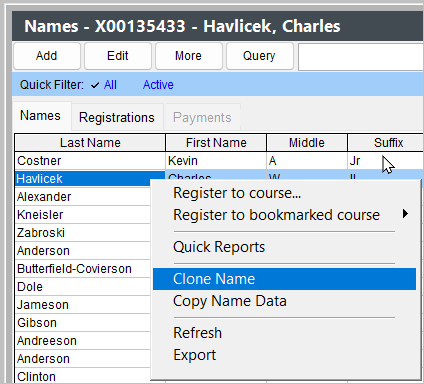
- A new name record opens with the cloned information. Edit the information then click the Save Changes button to save the new record.
Paste Address into Existing Name Record
You can paste the address from a cloned record into a an existing record:
- Clone a Name record.
- Find and open the Name record that needs the cloned address.
- Click the Paste Name Info button.
- Confirm that you want to overwrite the existing information with the information from the cloned record by clicking Yes on the Overwrite Current Address window.
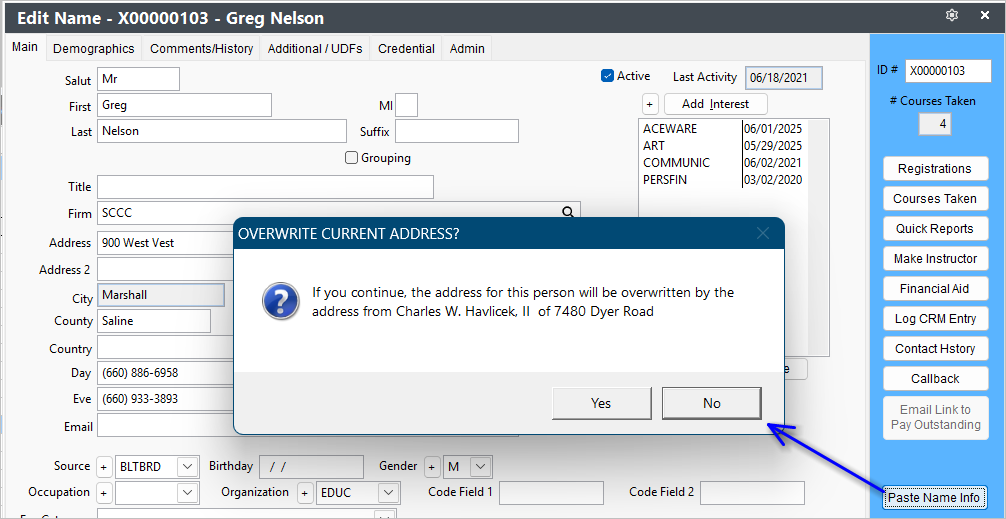
- Click the Save Changes button to save the changes to the Name record.
Speed Saving Tip
Name information is automatically copied when you save any name record, which can then be pasted using ALT+V to a new or existing (to overwrite) name record.
Information Pasted
The following information is pasted into the Name record:
- Last Name (NEW records only)
- Address Lines 1 and 2
- City
- State
- Zip Code
- Phone Numbers
- Email Address
- Fee Category
- Source Code
- Organization Code
Name Grouping
NEW and EXISTING records are added to the cloned name record's Name Group.