

My User Profile
Users can add/edit their information and set some of their user preferences from .
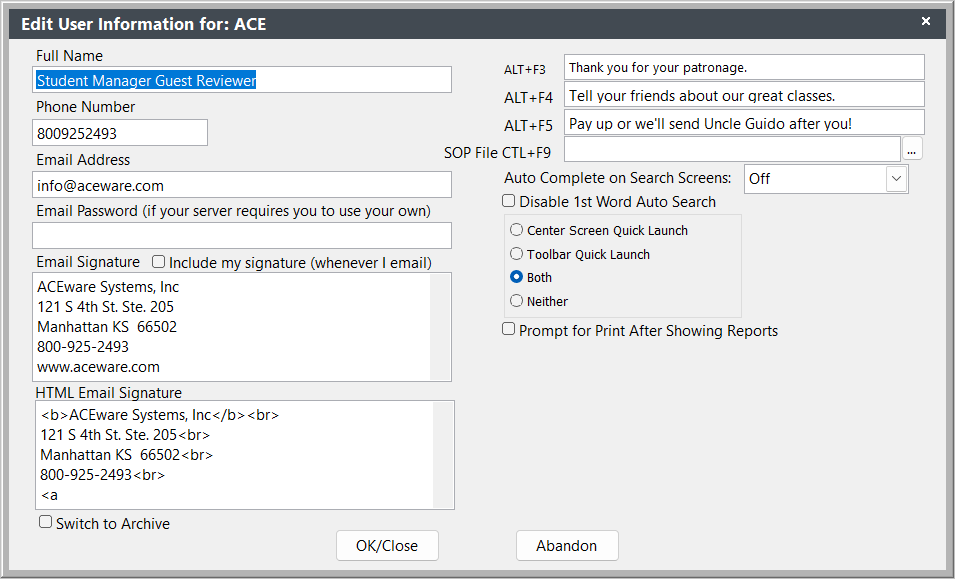
User Preferences
Full Name, Phone, Email, Signature - edit your full name, phone, email address, and email signature.
ALT+F3, F4, or F5 - store messages in these fields that can be recalled into a Student Manager field/query by using the appropriate shortcut key.
Email Password - enter your email password if your server requires you to use your own email credentials when sending emails.
Email Signature - used on text-type emails.
Include my signature (whenever I email) - check if you want to include your email signature on emails sent from Student Manager.
HTML Email Signature - email signature used when sending HTML formatted emails from Student Manager.
Prompt for Print After Showing Reports - only present if customer is using the reportreview.app - if checked, after closing the Print Preview screen, you will be asked if you want to print the report.
Switch to Archive - switch to your archived data.
SOP File CTRL+F9 - link to your SOP (Standard Operating Procedures) file. Set the path to the file with the ... button. View the file by pressing the Ctrl+F9 keyboard shortcut.