

Name Grouping
With the Name Grouping feature, you can group a series of Name records together and set one member as primary contact for the group.
To group Name records:
- Open the individual's Name record.
- Check the Grouping field.
- The Name Grouping screen now opens with the individual's name added to the group.
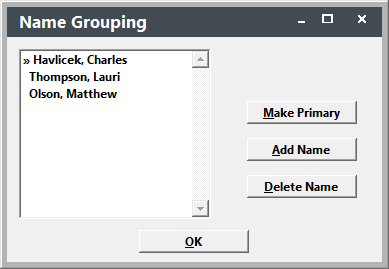
- To add new group members, click the Add Name button and select the new member from the Find window.
- After you’ve added all the members to the group, highlight the member who you want to set as primary contact, then click the Make Primary button. This will add the >> symbol next to the primary’s name denoting him as primary contact for the group (e.g. Havlicek, Charles in the above example).
- Click the OK button to save your Name Group and return to the Names screen.