

Notifications Window
A new feature in Student Manager 9.0.264 is a Notifications window that pops up when Student Manager opens.
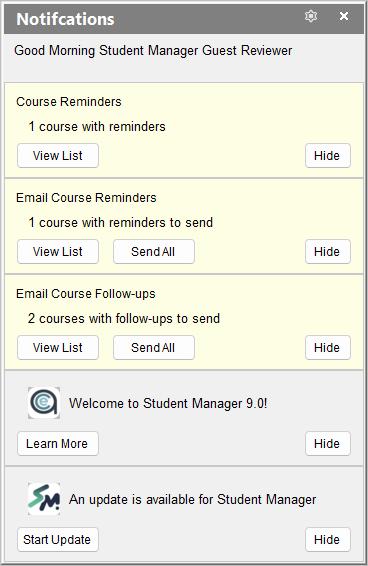
- View lists for specific reminders with the View List button.
- For options such as sending Course Reminders, click the Send All button to skip the list and go right to sending the notices.
- The system will check for updates on Tuesdays (for Student Manager administrators only) and display a notification if one is available.
- ACEware will occasionally post notices to the Notifications window (e.g. Welcome to Student Maanger 9.0, upcoming webinars or training sessions, etc.).
- The Hide button will hide some notifications permanently and some only for the current Student Manager session:
- Course Reminders, Email Course Reminders, Email Course Follow-Ups will only be hidden while you are logged into Student Manager.
- ACEware Notices (e.g. Welcome to Student Manager 9.0 and Update Available) will be hidden until a new notice is posted (by ACEware).
If you close the Notifications window, you can re-open it with the Notifications item on the Main Menu.