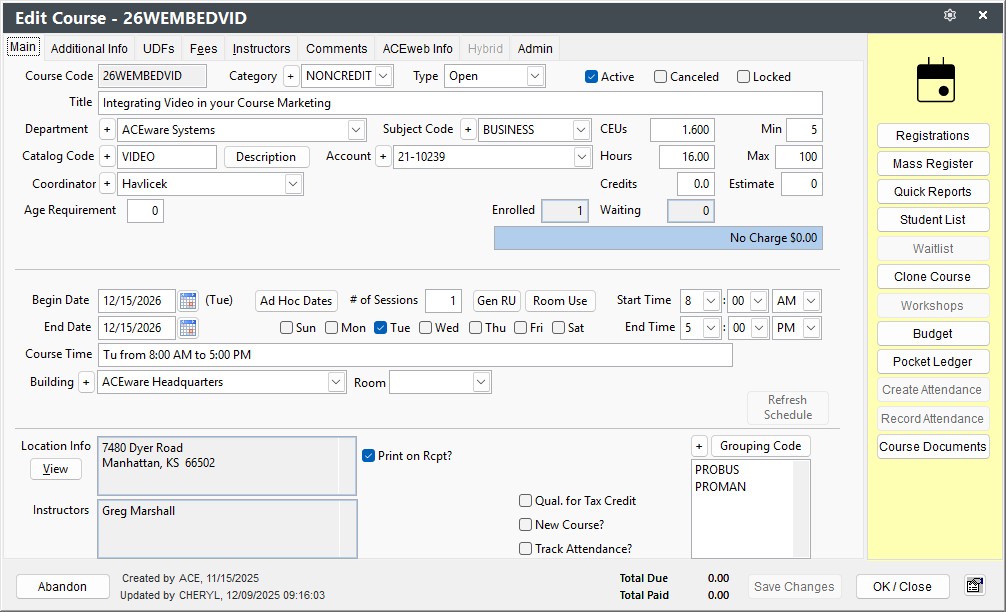
Course Screen
The Course screen consists of 9 tabs:
- Main - fields for main course information such as code, title, dates, times, etc.
- Additional Info - additional information such as alternate code, registration times, email attachments sent with registration confirmations, etc.
- UDFs - course user defined fields
- Fees - set up Main and Other fees for course.
- Instructors - assign instructors to course and enter pay details.
- Comments - registration warning message, notes to be printed on receipt, and internal notes for staff.
- ACEweb Info - ACEweb options such as publish settings, special pages, and workshop messages. Note: this tab can be turned off if you are not using ACEweb (Enable display of ACEweb options on Course Preferences).
- Hybrid - set up for Hybrid type courses.
- Admin - routines only available to administrators such as changing the course code or deleting the course.
Mouse over field for Field Name. Go to Data Structures to see more field information.