

Student Manager User Records
Set up Student Manager users and manage their security preferences from .
Password Maintenance Access
is only enabled for Student Manager administrators.
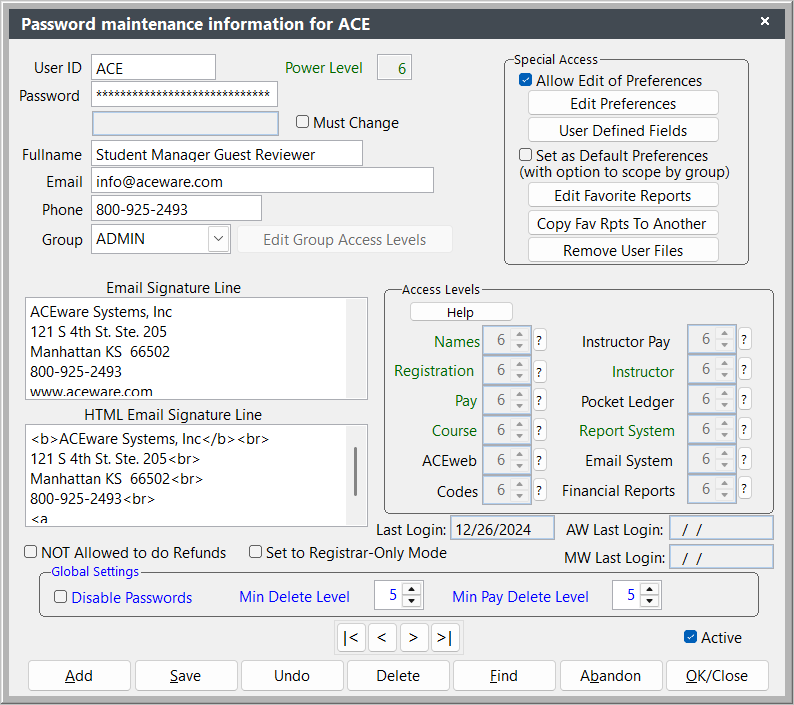
User Record Explorer
Student Manager 9.0.264 and later uses the new Explorer window for viewing user records. Additional options for the highlighted user can be accessed from the More button (e.g. access the user's favorite reports, edit their preferences, edit UDFs, etc.).
User Password
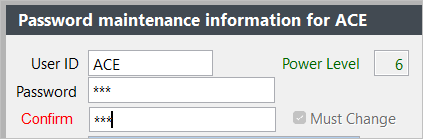
You must enter the password twice when creating a new user or resetting an existing user's password:
Access Levels
Set up users' Access Levels for the various modules.
Login Dates
Last Login - last time the user logged into Student Manager.
AW Last Login - last time the user logged into an ACEweb Adminstrative routine (if allowed).
MW Last Login - last time the user logged into the Manager Web interface.
Global Settings
- Disable Passwords - only enable for systems who have 1 user only.
WARNING
🚫 This setting MUST NOT be enabled if you have more than 1 Student Manager User.
Min Delete Level - the minimum Access level users must have in a module to delete records.
Min Pay Delete Level - the minimum Access level users must have in Pay to delete payments.
Other Settings
Edit Preferences - click this button to edit the user's preferences. Note, changes will not take effect until the user logs in the next time.
User Defined Fields - click this button to edit the user's UDF preferences. Note, changes will not take effect until the user logs in the next time.
Remove User Files - click this button to delete a user's files. Used in case of corruption of the user files (they will be recreated when the user logs in the next time).
Copy Fav Rpts To Another - click this button to copy the user's Favorite Reports to another user.
Set as Default Preferences - check this box to apply this User's preferences to other users. You can choose to apply the preferences to all users or only users in the user's group.
Active - the Active box must be checked for users to be able to log into Student Manager and ACEweb Administrative routines.
NOT Allowed to do Refunds - if checked, the user cannot run the Refund Wizard.
Set to Registrar-Only Mode - if checked, the user will be in Registrar-only mode when entering registrations.