

Name Fields Preferences
Enable/Disable Fields on the name screen.
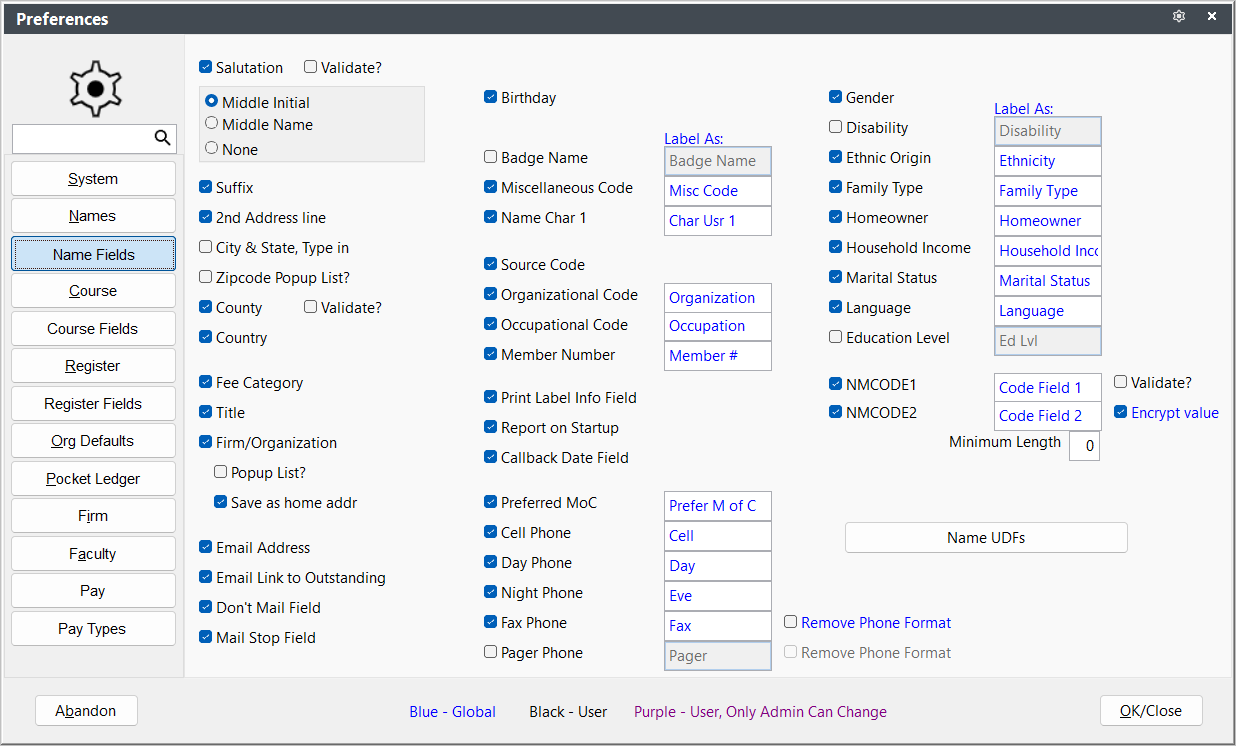
- City and State, Type in - allows you to manually enter the City and State. Since this option disables the zip code validation routine, we DON'T recommend selecting it.
- Encrypt Value NMCODE2 - encrypt the value stored in this field--meant mostly for organizations who store the individual's ID # in this field.
IMPORTANT
Encrypted fields cannot be used in searches/queries. If you encrypt this field, you can no longer query on the value in report areas.
- Minimum Length NMCODE2 - set the minimum length of NMCODE2 entries.
- Label As ... - allows you to relabel the field to collect data specific to your organization.
- Popup List? - enables popup list feature on selected fields (list of available entries pops up when you tab into the field).
- Report on Startup Callback Date Field - enables the check for callbacks routine during start up and displays any callbacks scheduled on that date for viewing/printing.
- Save as home addr Firm - if checked, enters the firm address as the individual's address when selecting a firm.
- Validate? Salutation and County - enables validation for these field entries.
- Zipcode Popup List? Country - enables validation for Country field. Country list comes from Zip Code records.